In the pricing per period setup model you will be able to define the structure of your Rate Plans during the creation of your Seasons and Events.
In [Catalog > Price rules > + Period > Add Season/Event] menu, go to the [Night rate plans] section. Always enter the information using the following logic: if you choose the base minimum stay (for example, 1 night), no discount is applied. If you set a higher number of nights to apply a discount (for example, from X nights), a discount percentage will be applied.
Example of use:
My minimum stay is 1 night, but if the guest stays from 2 nights, I give 10% off on the daily rates, if they stay from 5 nights, 30% and from 14 nights, 45%.
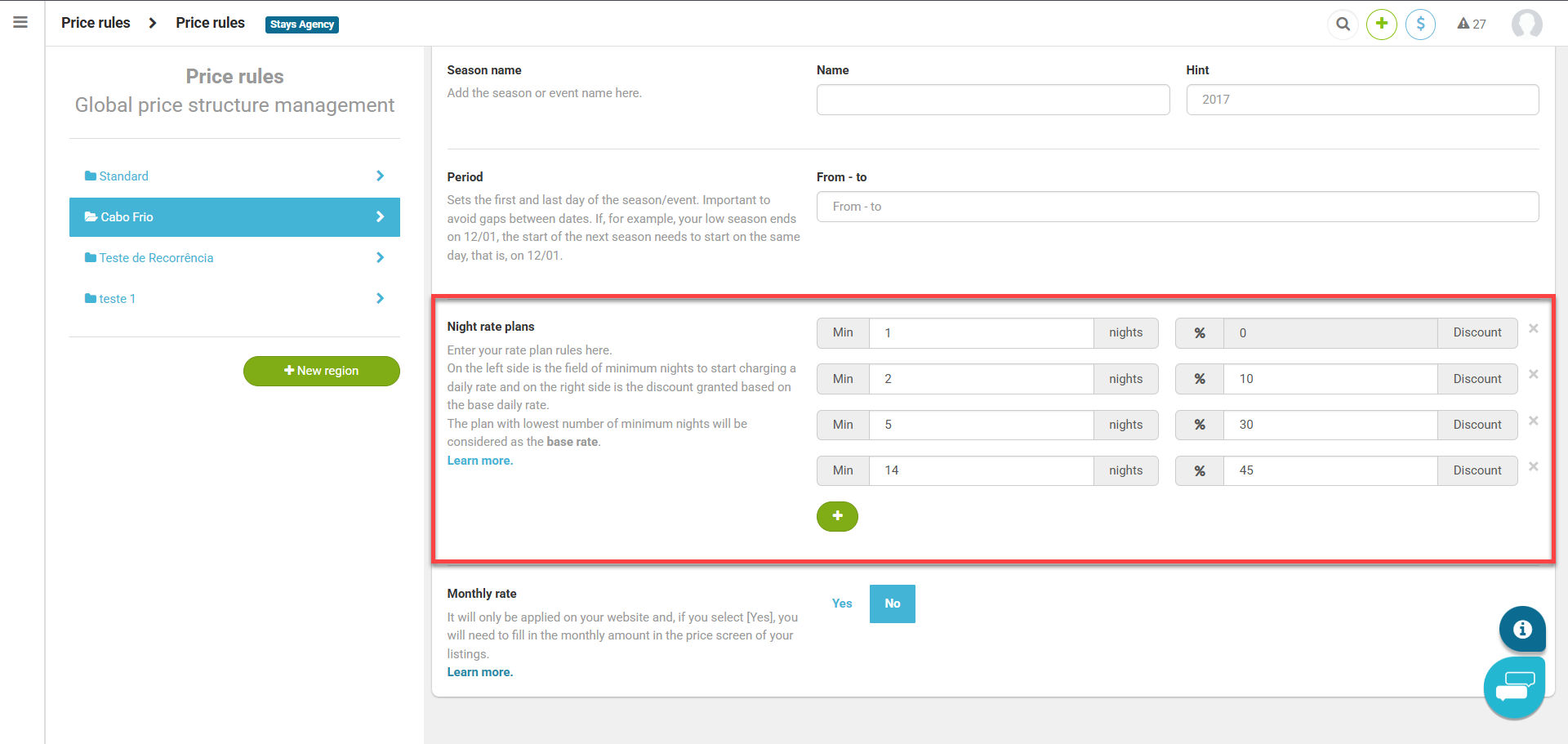
Supposing that the daily rate of a listing is R$ 500,00, the value charged from the guests would be as follows:
- Guests who stay only one night will pay R$ 500.00;
- Guests who stay from 02 to 04 nights will pay R$ 450.00 per daily rate (500 - 10%);
- Guests who stay between 05 and 13 nights will pay R$ 350.00 per daily rate (500 - 30%);
- Guests who stay for 14 nights on will pay R$ 225.00 per daily rate.